Best Quicken Alternatives for 2026
Best Alternatives to Quicken: Free and Paid Replacements
Is there a good replacement for Quicken? Check out this list of best alternatives (including free options) to manage your money.
 |
| © CreditDonkey |

Quicken started in 1983 and was once the top choice for managing personal finances. But times have changed since the days of VHS tapes.
This tool tries to keep up, but many finance management apps have since emerged, boasting more advanced tools and features.
Its transition to a yearly subscription even made some people think it's not as great a value as before.
It might be time for something better. Discover the top easy-to-use alternatives to Quicken below.
| Quicken Alternative | Best For |
|---|---|
| 1. Empower | Overall personal finance |
| 2. You Need A Budget (YNAB) | Overall budgeting |
| 3. Tiller | Spreadsheet budgeting |
| 4. PocketSmith | Retirement planning |
| 5. Moneydance | Bill pay |
| 6. Banktivity | Mac/iOS |
| 7. CountAbout | Transferring data from Quicken |
| 8. EveryDollar | Budgeting beginners |
| 9. GnuCash | Personal accounting without a subscription |
| 10. Monarch | Serious savers |
| 11. Moneyspire | Managing personal and business finances |
| 12. Simplifi | Comprehensive yet simplified overview |
| 13. Dollarbird | Budgeting calendars |
| 14. Goodbudget | Couples and roommates |
PRO TIP: Try our free budget calculator to visualize your monthly expenses right now. No login required.
What are the best alternatives to Quicken?
Money management should be free from glitches and lag. Find out which Quicken competitors offer a better—and more affordable—user experience.
Quicken used to offer a free program called Quicken Online. But Intuit dropped the program after it bought Mint. Today, one of the best free alternatives to Quicken is Empower, which lets you monitor all your financial accounts in one place.
Compare Top Deals and Promos

- Simple: The app should be easy to use.
- Secure: The app should have strong security features.
- Syncs: The app should sync seamlessly with your bank accounts and other financial tools.
Best Overall: Empower (FREE)
If you want a full picture of your finances, Empower Personal Dashboard is your best bet. Like Quicken, Empower tracks your spending patterns and categorizes them. You can see your entire financial life in one place, including your net worth over time and your investments.
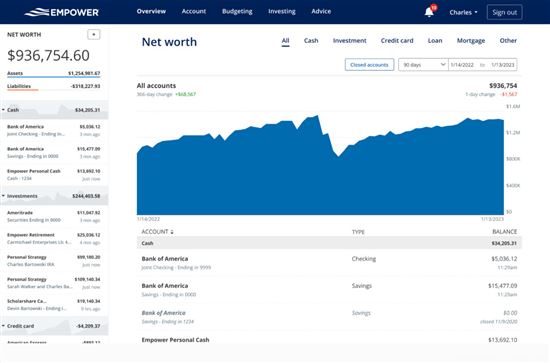 |
| credit empower |
Empower excels in investment tracking by offering personalized insights and tools for retirement planning. Plus, it's a completely free alternative to Quicken.
On the downside, there's no bill pay capability, though it does offer limited bill tracking and reminders. Manual transactions are supported, but with some limitations, and alert customization is fairly basic. Nonetheless, this alternative still packs in lots of useful features, including optional paid wealth management services.
Key Features
- Pricing: Free
- Free Trial: N/A
- Accessibility: Web, iOS, and Android
- Import From Quicken: No
Quicken has more features. But for the value and its solid range of valuable tools, Empower is the winner.
Empower is great for long-term savers and investors. For better help with your day-to-day spending, don't miss the next app.
Learn more: Empower full review
Best Budgeting Tool: You Need A Budget
You Need A Budget (YNAB) focuses primarily on budgeting. It uses a strategy called "zero-based budgeting." Every dollar you earn must have a plan, whether it goes toward groceries, rent, or savings.
 |
| Courtesy of YNAB |
YNAB also helps you plan for big expenses so that you have enough saved when they come. The app holds you more accountable than Quicken does. If you overspend, you'll get an alert. The app will help you adjust your budget by moving money from another category.
It also offers educational resources, such as live workshops and guides, to help you build confidence managing your money. The service is an easy introduction to the world of budgeting. It's great for beginners looking to gain control of their finances.
Key Features
- Pricing: $14.99/mo or $109/yr[1]
- Free Trial: 34 days
- Accessibility: Web, iOS, Android, and Alexa devices
- Import From Quicken: Yes; QIF compatible
YNAB is great if you're serious about creating and sticking to a budget. It'll help improve your financial situation from the ground up. Quicken offers more comprehensive tools beyond simple budgeting.
For those who want to explore similar apps, here's our list of the top YNAB alternatives.
For Spreadsheet Budgeting: Tiller
Tiller is an excellent choice if you prefer seeing your finances organized into spreadsheets. This web-based service is highly customizable and automatically updates your transactions in Google Sheets or Excel. You can create multiple budgets and track what matters most to you.
 |
| Credit: Tiller Money |
Tiller's interface is simpler and more flexible than Quicken's more complex menus. It concentrates on straightforward budgeting without the bells and whistles, so you may need another tool if you're looking for investment tracking.
If spreadsheets are your go-to choice for organizing your financial life, this could be a great choice. The platform is free for the first 30 days and costs $79 per year afterward.[2]
Key Features
- Pricing: $79/yr[2]
- Free Trial: 30 days
- Accessibility: Add-on for Google Sheets and Microsoft Excel (365)
- Import From Quicken: Yes; CSV compatible
Tiller keeps it simple by feeding all your financial data into Google Sheets or Microsoft Excel. It's a good alternative if you're looking for spreadsheets that are more user-friendly than Quicken.
Tiller is also good for Chromebook users since Chromebooks can't run the full desktop version of Quicken natively.
Your operating system shouldn't hold you back from quality budgeting tools. Apple fans, be sure to check out the succeeding apps.
Retirement Planning: PocketSmith
PocketSmith is a good tool for budgeting and tracking spending. But its standout feature is the ability to forecast your money based on current expenses, income, and spending habits. It can predict your account balances up to 60 years into the future with a Fortune plan.
Instead of simply listing your bank transactions, the app organizes them in a calendar view. From there, you can also see upcoming income and expenses. If you're a visual person, this is a great way to understand where your money goes.
Another unique feature is the "what if" scenarios. You can test decisions to see how they would affect your finances. For example, you could predict how having a wedding would impact your plans and finances.
PocketSmith's free plan only supports manual transaction import, while paid options provide automatic syncing. The latter offers more complex features like budget projections and an unlimited number of accounts, among others.
Key Features
- Pricing: Free, Foundation ($14.95/mo or $119.95/yr), Flourish ($24.95/mo or $199.95/yr), Fortune ($39.95/mo or $319.95/yr)[3]
- Free Trial: N/A
- Accessibility: Web, iOS, Android; Beta version for Windows, Mac, and Linux[4]
- Import From Quicken: Yes; QIF compatible, CSV (for Mac)[5]
Both programs offer a retirement planner. But PocketSmith has a slight advantage. PocketSmith gives you in-depth insight into your future finances. It's especially helpful if you have FIRE (Financial Independence, Retire Early) goals.
Bill Pay: Moneydance
Unlike most budgeting programs, Moneydance doesn't upload your data to the cloud. Your information is saved only to your hard drive—unless you download the app to your phone or sync to another computer.
This bill pay program offers advanced financial tracking and budgeting tools, such as financial graphs and reports, investment tracking, and bill reminders. It's also one of the few budgeting apps that offer bill pay.
Moneydance costs $72.80 for lifetime access to the current version of the program.[6] It has a 90-day money-back guarantee and a free upgrade to the next major release. You may also be entitled to discounts for succeeding upgrades.
Key Features
- Pricing: Free account with 100 transactions, Purchase ($72.80 one-time fee), Subscribe ($10.08/mo or $100.80/yr), Purchase addon: Moneydance Plus ($4.48/mo or $44.80/yr)[6]
- Free Trial: 14 days (for Moneydance Plus subscription)
- Accessibility: Windows, Mac, Linux, iOS, Android[7]
- Import From Quicken: Yes; QIF compatible[8]
Moneydance comes with online bill pay included in its price. To use Quicken's Bill Manager function, you have to pay extra.[9]
You work hard for your money. Don't let a single dollar slip by unaccounted for. Whether it's euros, yen, or other currencies, stay on top with the app that works wherever you are.
Try Moneydance Free for 100 Transactions
For Mac: Banktivity
Sick of missing out on features because you use a Mac? Banktivity is a strong option built specifically for Apple users. It's available on macOS and iOS, and it syncs across devices: Mac, iPhone, iPad, and Apple Watch.
 |
| Courtesy of Banktivity |
Banktivity supports envelope-style (zero-based) budgeting, where you assign your income toward expenses, savings, or debt payments.
Other features include setting savings goals and paying bills from the app. You can also build interactive, custom reports that give you great insight into your financial health.
Banktivity offers 3 pricing tiers. The Bronze plan only tracks your banking and credit accounts. The Silver plan includes investments, loans, and real estate tracking. The Gold plan can track accounts in different currencies.
Key Features
- Pricing: Bronze ($59.99/yr), Silver ($79.99/yr), Gold ($99.99/yr)[10]
- Free Trial: 30 days
- Accessibility: Mac and iOS apps
- Import From Quicken: Yes; QIF compatible[11]
Quicken for Mac still lacks some features compared to its Windows version. Banktivity offers a strong set of tools for Mac users, including investment tracking and portfolio analysis. Plus, it syncs seamlessly across Mac and iOS devices.
Try Banktivity Free for 30 Days
Looking for a Free Alternative?
Empower Personal Dashboard is one of the best free alternatives to Quicken in terms of overall features. You can link all your financial accounts, and it offers advanced investment tracking and retirement planning tools that rival Quicken's. It's also accessible on both Mac and Windows via the web.
Transitioning to a new app can be more of a headache than it's worth. But some make it easier to switch than others.
The next Quicken alternative allows you to start a completely new tracking system without losing all the progress you've made.
Transfer Data From Quicken: CountAbout
CountAbout is a budgeting tool that makes it easy to leave Quicken. This program seamlessly imports your data from Quicken and Mint, so you can keep budgeting right where you left off.
Just like Quicken, CountAbout automatically syncs transactions across all your linked accounts (for Premium accounts only). But CountAbout shows even transactions that have not yet been processed.
CountAbout offers two annual subscription plans, Basic and Premium, designed for ad-free, secure budgeting. The primary difference is that Premium offers automatic transaction syncing with financial institutions, while Basic requires manual transaction entry or file imports.
Key Features
- Pricing: Basic ($19.99/yr), Premium Plan ($54.99/yr)[12]
- Free Trial: 45 days
- Accessibility: Web, iOS, Android
- Import From Quicken: Yes[13]
If you're paying for Quicken features you don't even use, consider simplifying with CountAbout. The program isn't as feature-rich as Quicken, but it's a simple app that can import data from Quicken and Mint.
Where will you be financially in 10 years? How about 20? Take the guesswork out of your future finances with the next smart app.
Try CountAbout Free for 45 Days
Budgeting Beginners: EveryDollar
EveryDollar is based on Dave Ramsey's 7 Baby Steps approach to personal finance. If you're not sure where to start your personal finance journey, this app can provide direction.
 |
| Credit: Everydollar |
The steps include saving for an emergency fund and paying down your debts, starting from the lowest balances. The idea is that you'll get a psychological boost with each little victory, so you'll actually stick to your financial goals.
The app uses zero-based budgeting to make you assign every dollar to a category. This is purely a budgeting app, so you won't find any investing or retirement tools.
It costs $129.99 per year for the Financial Peace All Access, which includes Financial Peace University (FPU) class, 12 months of EveryDollar Premium, 20+ audiobooks, and extra courses.[14] You can get the free version of the EveryDollar app, but it is very limited and requires you to track everything manually.
Key Features
- Pricing: Limited free version; EveryDollar Premium ($17.99/mo or $79.99/yr)[15]
- Free Trial: 14 days
- Accessibility: Web, iOS, Android
- Import From Quicken: No
Quicken is probably the most comprehensive financial tool on the market. But that can be a bad thing if you're new to money management. EveryDollar makes budgeting more accessible by breaking it down into easy steps.
Try EveryDollar for Free for 14 Days
Learn more: EveryDollar full review
Not all free programs are limited in features. Find out which Quicken competitor punches above its class—and doesn't cost a penny.
Personal Accounting Without a Subscription: GnuCash
If you're looking for an alternative to Quicken but aren't willing to give up many of the features that Quicken offers, GnuCash could be right for you.
GnuCash is a free, open-source accounting program. It can help you track your bank accounts as well as your investment portfolio. It can even help small business owners with bookkeeping and invoicing.
You can import QIF files from Quicken to make the switch even easier. Although it doesn't have all the features and automation of paid programs, it's still a solid free alternative to Quicken.
Key Features
- Pricing: Free
- Free Trial: N/A
- Accessibility: Linux, Windows, Mac
- Import From Quicken: Yes; QIF, QFX, and OFX compatible[16]
This one isn't much of a competition. Quicken has switched to a subscription-only model, while GnuCash is available as a free, open-source program.
For Serious Savers: Monarch
Monarch adopts a flexible version of zero-based budgeting. Although it encourages a more disciplined approach, it can adjust to your financial situation.
When you set a goal or target, the app creates a category with a suggested monthly contribution. This helps ensure savings are prioritized within your budget. You can monitor your progress through its dashboard and widgets.
Its powerful portfolio tracking tools allow you to stay on top of your asset allocation and make adjustments if needed.
Monarch also supports multiple users, allowing you to share budgets with your spouse or family. If you don't recognize a specific transaction, you can tag it for review so that another user can take a look.
Key Features
- Accessibility: Web, iOS, Android
- Import From Quicken: Yes; CSV compatible[17]
With Monarch, you get a range of customization features, such as adjustable dashboards and transaction rules. Quicken, on the other hand, offers more traditional tools but can feel cluttered or overwhelming for some users.

Start Managing Your Money
- Unlimited financial accounts
- Rollover budgeting
- Investment and subscription tracking
- Custom financial goals, reports, and categories
- Venmo, Coinbase, and Zillow support
- Unlimited collaborators
- Sync vehicle values
- Web and mobile apps
For Managing Personal and Business Finances: Moneyspire
If you are a small business owner, Moneyspire may be worth considering. Thanks to its customizable categories and reports, you can use one platform for both your personal and business finances while keeping them separate.
You can save the report query, making it easy to adjust at a later time. Once you're done with an account or transaction, you can easily hide it from plain sight so it doesn't distract from other active transactions in your timeline.
It may be a bold claim, but this tool supports not just multiple but ALL currencies. A Japanese Yen account, you ask? No problem. And if you're not comfortable with syncing your bank accounts automatically, you can choose to go offline.
Key Features
- Pricing: $99.99 one-time; $99.99 optional upgrades; May offer limited-time discounts[18]
- Free Trial: Yes; limited free version available
- Accessibility: Desktop, iOS, Android
- Import From Quicken: Yes; QIF, QMTF, OFX, QFX and CSV compatible[19]
Aside from tracking invoices, Moneyspire enables you to print checks (on pre-printed check stock). Quicken has extra tools for managing property rentals and tax prep.
Try Moneyspire Free for 14 Days
For Comprehensive yet Simplified Overview: Simplifi
Since Simplifi is also by Quicken, you can expect it to be a solid option for its target market, like the Quicken Classic. It aims to simplify the money management process for a young audience who are likely to be casual users.
The app is user-friendly and very straightforward, allowing you to see the big picture at a glance. Balances provided are typically accurate since they always deduct pending transactions from total balances. With Quicken Classic, you may be off a few cents and not know what caused it.
Simplifi features a Watchlist to help monitor specific spending categories through visual reports. It also includes investment tracking features for some cryptocurrencies.
Quite surprisingly, there is no direct data import tool from Quicken Classic to Simplifi. The only option is to manually import data via a CSV file.
Key Features
- Pricing: $5.99/month; May offer limited-time discounts[20]
- Free Trial: N/A
- Accessibility: Web, iOS, Android
- Import From Quicken: No
Although both Quicken products provide a comprehensive financial overview, Quicken is more granular than Simplifi. It allows you to create customizable budgets for up to 12 months. Simplifi's flexibility in accommodating any budgeting method appeals to many users.
It can be hard to gain insight from a laundry list of transactions. Instead, look for an app that visually organizes your money (like the one below).
Calendar-Based Budgeting: Dollarbird
Most apps just list your expenses by category. But this doesn't help you plan out your expenses and prepare to pay bills.
Dollarbird is a calendar-based budgeting app that helps you manage your cash flow on a monthly and daily basis. If you have irregular income or unpredictable expenses, Dollarbird could be perfect for you.
 |
| Screenshot of Dollarbird |
Dollarbird organizes your expenses into categories and tracks your average monthly spending in each category. This lets you know if you're spending much more than usual on things like eating out, groceries, or entertainment.
You can also add future and recurring transactions. Dollarbird will track them and show your projected financial situation.
Note that Dollarbird does not automatically connect to your bank accounts or credit cards. It's up to you to manually add your info and confirm the recurring transactions, like credit card payments that Dollarbird's AI predicts.
Dollarbird Pro allows up to 20 calendars with up to 3 team members on each calendar.
Key Features
- Pricing: Pro ($7.99/mo or $59.99/yr), Pro Unlimited ($9.99/mo or $79.99/yr), Business (custom pricing)[21]
- Free Trial: N/A
- Accessibility: Web, iOS, Android
- Import From Quicken: No
Quicken has a calendar view, but it feels clunky compared to Dollarbird. Dollarbird also allows you to add multiple users. You can easily access and edit your calendar on mobile and desktop.
Couples & Roommates: Goodbudget
Goodbudget uses the envelope budgeting system to help you plan how much money to allocate to different spending categories. You assign a set amount of money to each "envelope" for budgeting purposes.
 |
| Screenshot of Goodbudget |
This straightforward platform doesn't prevent you from overspending an envelope, but it will notify you when you go over your allotted amount. Unlike Goodbudget, Quicken uses more traditional budgeting tools where you manually set and track monthly limits.
The free version only allows one linked financial account and 10 envelopes. The paid version unlocks unlimited synced accounts and envelopes.
Key Features
- Pricing: Free, Plus ($10/mo or $80/yr)[22]
- Free Trial: N/A
- Accessibility: Web, iOS, Android
- Import From Quicken: Yes; QFX, OFX, and CSV compatible[23]
Quicken isn't designed to support multiple users or data sets. Goodbudget can be a great way for families or roommates to sync budgets and avoid surprises at the end of the month.
What are the best Quicken alternatives for small business?
From invoicing to bookkeeping to inventory tracking, there's a lot that goes into your business. Find a program that does it all with these powerful Quicken replacements.
1. Best Small Business Accounting: QuickBooks Online
QuickBooks Online is an excellent accounting program for small business owners. You can link up your bank accounts and credit cards, as well as over 800 business apps (including Shopify, Square, PayPal, and much more).
The software goes beyond basic expense tracking. It's also packed with features like invoicing, tax deductions, bank reconciliation, inventory management, and employee time tracking.
QuickBooks offers 4 pricing tiers for QuickBooks Online. Simple Start, Essentials, Plus, and Advanced plans are geared toward small business accounts.
Key Features
- Pricing: Simple Start ($38/mo), Essentials ($75/mo), Plus ($115/mo); Advanced ($275/mo); May offer limited-time discounts[24]
- Free Trial: 30 days
- Accessibility: Web, Mac, Windows, iOS, Android
Learn more: QuickBooks Online full review
2. Small Business Mac Users: FreshBooks
FreshBooks is an accounting platform designed for freelancers and small businesses. It offers comprehensive tools like invoicing, expense tracking, and double-entry accounting.
The software integrates with more than 100 apps, so you can link your Shopify, Squarespace, Google Workspace, and more.
FreshBooks has a clean, user-friendly interface that works well on any platform. If you're a Mac user, you'll especially like how well it syncs across all your devices. With their mobile app, you can stay connected to your business no matter where you are.
FreshBooks has multiple pricing tiers. Lite, Plus, and Premium plans support billing for up to 5, 50, and unlimited clients, respectively. Or, you can go for the Select plan and get custom pricing with advanced features and support for larger businesses.
Key Features
- Pricing: Lite ($23/mo or $276/yr), Plus ($43/mo or $516/yr), Premium ($70/mo or $840/yr), Select (custom pricing); May offer limited-time discounts[25]
- Free Trial: 30 days
- Accessibility: Web, Mac, Windows, iOS, Android
3. Best for Growing Business: Xero
Xero offers a comprehensive set of features for small-business accounting. Like the other platforms, Xero handles invoicing, expenses, inventory, and more. You can also connect bank accounts and integrate with apps like PayPal, Square, and Gusto.
Xero also lets you import data from other accounting software, so you won't lose your old transactions when switching. It also allows unlimited users with every plan, which lets you collaborate with your team and save time.
There are 3 plans available. The Early plan limits you to just 20 invoices and 5 bills. The Growing plan gets unlimited invoices and bill management. The Established plan includes project tracking and expense claims. You can cancel your subscription at any time with a 30-day notice.
Key Features
- Pricing: Early ($25/mo), Growing ($55/mo), Established ($90/mo); May offer limited-time discounts[26]
- Free Trial: 30 days
- Accessibility: Web, iOS, Android
What are common complaints about Quicken?
If you're frustrated with Quicken, you're not alone. Some of the biggest concerns expressed by users are:
Issues with Syncing
Quicken allows you to link bank accounts, including credit cards, but some users report occasional syncing issues or delays with certain financial institutions.
Customer Support Limitations
Some users have raised concerns about customer support responsiveness. Phone support is generally available, but access and priority may vary depending on your subscription plan.
Desktop Software Required for Mobile Access
You can only use their mobile app if you already have a regular Quicken desktop account.[27] This is unlike other personal finance software that lets you operate exclusively from a mobile phone or tablet.
Perception of Being Outdated
Quicken has been around for decades, and while it continues to be updated, some users feel its interface and experience are less modern compared to newer apps.
How do I choose the right app?
Everyone's needs are a little different. The best financial app should fit your situation without compromising on essentials, like security.
Whether it's an app from this list, or a different one entirely, here's what to look for when test-driving a budgeting software:
Security Features
As with any online financial tool, review the app's security measures before you commit. A few things to look for are two-factor authentication and data encryption.
Ease of Use
It's important that you actually enjoy the interface of your money tool. After all, a tool is only helpful if you actually use it. If an app feels clunky and confusing during the trial period, it might not be right for you.
Flexibility
Your financial situation is unique. A personal finance or small business app should be able to support your needs. Look for apps that let you customize spending categories, invoices, or whatever else is important to you.
Relevance to You
Some apps offer a wide range of features. But, be realistic about how many of those are actually useful to you—especially if it's a paid app. You might find that a simpler or free option works just as well.
Synced Accounts
Software that syncs your bank accounts, credit cards, and other financial data will save you a lot of precious time. This feature ensures that you'll have an accurate picture of your finances at your fingertips at all times.
Choosing a new budgeting tool takes time and research. Find out below how to get insight into your finances right now—without needing to download any apps.
Free budget calculator
Take control of your finances by learning exactly where your money goes. Try our free monthly budget calculator to get a clear visual of your spending. Plus, find out if you're saving enough according to the 50/30/20 rule.
Setting a budget is way easier when you take some time to figure out what's important to you. Have a student loan debt you want to pay off faster? Or a vacation you want to save up for? Try reducing your budget in another area to see how much money you could free up.
Of course, you can still spend some money on fun stuff. But it's all about moderation and making sure you're in good financial health first.
Frequently asked questions
- What is the best financial software for personal use?
The best financial software depends on your needs and how much you're willing to pay. Empower Personal Dashboard is a great free option to start with. You can link your accounts, track your net worth and investments, and access financial planning tools. - Is Quicken being discontinued?
Quicken has no announced plans to discontinue its services, though some older versions of its software have been phased out over time after Intuit sold Quicken in 2016. Quicken encourages customers to use the most up-to-date software to take advantage of the latest features and tools. - Is Quicken subscription only?
Quicken now uses a subscription-based pricing model, typically billed annually. While it includes some cloud-connected features, it remains primarily desktop-based software rather than a fully cloud-based platform. - Do you have to renew Quicken every year?
Quicken is sold as a subscription, typically billed annually. If you choose not to renew, you can still access your data for a limited time, but most features, such as updates, online services, and account syncing, will stop working. Continued full use of the software requires an active subscription. - Is Quicken worth it anymore?
Quicken could still be worth it for you if you have more complex finances to track. It's good if you have lots of investment accounts, a business, or properties to track. But if you just need an app for budgeting and simple expense tracking, there are lots of free alternatives. - What Quicken alternatives offer bill payment features?
Most money management apps offer bill reminders, but Moneydance is one of the few Quicken alternatives with a bill pay feature. It lets you schedule one-time or recurring payments directly within the software. It is available as a one-time purchase for lifetime use. - Which Quicken alternative works with Windows?
Most of the tools in this list (except for Banktivity) are compatible with Windows. Many are also web-based, meaning you can access them from your browser without installing desktop software. - What is the best non-cloud alternative to Quicken?
If cloud-based software is a security concern, try Moneydance instead. It's local software, so all your data stays on your hard drive. The only time the program uses the cloud is when you choose to sync to another device. But your info is encrypted, and they don't store it in the cloud. - What is zero-based budgeting?
With zero-based budgeting, you deliberately "spend" all your money until you're left with $0. Each dollar is designated for a purpose: rent, savings, debt repayment, etc. This approach helps reduce overspending by planning all income.
Bottom line
Budgeting is a crucial step toward financial freedom. If you're switching from Quicken or just need a new program to organize your money, you can't go wrong with the choices above.
For powerful financial tools without spending a lot of money, make sure to check out Empower. It's a great fit to keep your current finances in order and prep you for a successful retirement later on.
But a budget is only useful if it fits your lifestyle and preferences. Be sure to go with a program that's easy and enjoyable for you to use. Most of the programs on the list offer free trials. Take advantage of testing out their service before you commit.
With just a little bit of help, you'll surely make progress with your financial goals.
References
- ^ You Need A Budget. Pricing, Retrieved 05/01/2026
- ^ Tiller. Try Tiller Completely Free, Retrieved 05/01/2026
- ^ PocketSmith. Plans & Pricing, Retrieved 05/01/2026
- ^ PocketSmith. Download the PocketSmith Personal Finance Desktop App, Retrieved 05/01/2026
- ^ PocketSmith. Importing Accounts and Transactions from Quicken, Retrieved 05/01/2026
- ^ The Infinite Kind. Purchase Moneydance, Retrieved 05/01/2026
- ^ The Infinite Kind. Downloads, Retrieved 05/01/2026
- ^ The Infinite Kind. Importing Data from Quicken in QIF Format, Retrieved 05/01/2026
- ^ Quicken. Bill Manager, Retrieved 05/01/2026
- ^ Banktivity. Pricing, Retrieved 05/01/2026
- ^ Banktivity. How Do I Move from Quicken Windows to Banktivity for Mac?, Retrieved 05/01/2026
- ^ CountAbout. Plans & Pricing, Retrieved 05/01/2026
- ^ CountAbout. Frequently Asked Questions, Retrieved 05/01/2026
- ^ Ramsey Store. Financial Peace All Access Annual Subscription, Retrieved 05/01/2026
- ^ Ramsey Solutions. EveryDollar, Retrieved 05/01/2026
- ^ GnuCash. Quicken Migration, Retrieved 05/01/2026
- ^ Monarch. Import Data Manually from Banks or Other Finance Apps, Retrieved 05/01/2026
- ^ Moneyspire. Buy Moneyspire, Retrieved 05/01/2026
- ^ Moneyspire. Features, Retrieved 05/01/2026
- ^ Quicken. Simplifi, Retrieved 05/01/2026
- ^ Dollarbird. Plans, Retrieved 05/01/2026
- ^ Goodbudget. Sign up, Retrieved 05/01/2026
- ^ Goodbudget. How to Import CSV Files, Retrieved 05/01/2026
- ^ QuickBooks. QuickBooks Online, Retrieved 05/01/2026
- ^ FreshBooks. Pricing, Retrieved 05/01/2026
- ^ Xero. Pricing, Retrieved 05/01/2026
- ^ Quicken. Quicken Mobile Companion App User Guide, Retrieved 05/01/2026



3% Match on IRA with Robinhood Gold
Earn 3% IRA match on all eligible contributions with Robinhood Gold. Terms and conditions apply. This is a limited-time offer.
Write to Anna Johnson at [email protected]. Follow us on Twitter and Facebook for our latest posts.
Note: This website is made possible through financial relationships with some of the products and services mentioned on this site. We may receive compensation if you shop through links in our content. You do not have to use our links, but you help support CreditDonkey if you do.
Empower Personal Wealth, LLC (“EPW”) compensates CREDITDONKEY INC for new leads. CREDITDONKEY INC is not an investment client of Personal Capital Advisors Corporation or Empower Advisory Group, LLC.
|
|
| ||||||
|
|
|





Compare: